Connect Forgejo to Windshift
Link a self-hosted Forgejo instance to Windshift through the Gitea-compatible API, start branches and pull requests from a work item, and keep review status on the item.
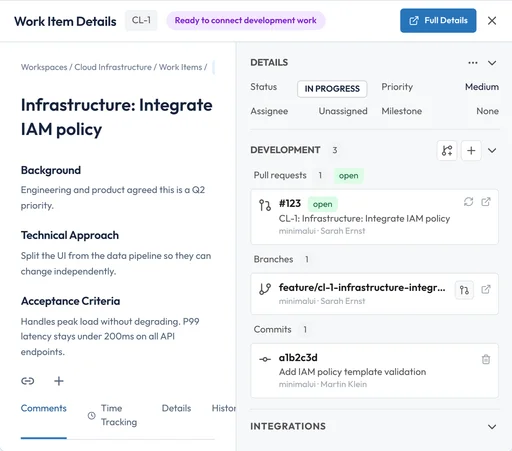
Create a branch and a pull request from the work item, link a commit, and watch the review status follow the change.
What the integration gives you
The connection lives in your Windshift instance and calls the provider API directly.
- Link repositories: Discover the repositories the connection can reach, then link the ones a workspace tracks.
- Connect changes to work items: Link pull requests or merge requests to the work item, and read item keys from branch names and commit messages.
- Start from a work item: Create a branch and open a change request without leaving the item.
- Follow review threads: Read review comments so a teammate or an agent can continue from the discussion.
- Track releases: Attach a tag to a milestone and see which changes shipped with it.
- Stay current: Webhooks update linked repositories after each push or review event, with polling as a fallback.
- Issue sync is available on the GitHub integration only. This integration links branches, commits, and change requests, not its issue tracker.
Ways to connect
Forgejo is a community fork of Gitea and keeps the Gitea API compatible. Windshift connects to Forgejo through the same provider it uses for Gitea, so repository links, branches, commits, pull requests, reviews, releases, and webhooks work the same way.
Windshift creates branches and change requests, so the connection needs write access, not only read access.
- OAuth App: Register an OAuth application in Forgejo. Each user authorizes their own account, and Windshift refreshes the token automatically.
- Access token: Create an access token in Forgejo and use it for all Windshift operations. Use a dedicated account for server-to-server work.
Set up the integration
A Windshift administrator configures the provider once. Workspace administrators then link repositories.
Keep the credentials with the team that owns the Git host. Rotate the token or secret on the same schedule as your other service accounts.
- Create the credentials in Forgejo: Register an OAuth application or create an access token. For OAuth, set the redirect URI to the callback URL that Windshift shows.
- Add the provider in Windshift: Open Settings, SCM Providers, add a provider, choose Gitea / Forgejo, and enter the Forgejo instance base URL, for example https://forgejo.example.com.
- Connect a workspace and link repositories: Connect the provider to the workspace and link the repositories the workspace tracks.
- Confirm the webhook: Windshift registers a repository webhook when the connection allows it. Verify the delivery in the repository settings on Forgejo.
Permissions and scopes
Exact permission names follow the provider. Check them against your instance policy before you grant access.
- Link and browse repositories: The connecting account can access the repository.
- Create branches, pull requests, and comments: Repository write access.
- Register the repository webhook: Repository administration access.
- OAuth scopes: read:user read:repository write:repository
Self-hosted notes
Forgejo is self-hosted, so the base URL is required. Both servers must reach each other for OAuth callbacks, webhooks, and API calls. If the instance uses a self-signed certificate, the Windshift host must trust the certificate authority.
Frequently asked questions
Why is Forgejo configured as Gitea in Windshift?
Forgejo keeps the Gitea API compatible, so Windshift uses one provider for both. Choose Gitea / Forgejo and enter the Forgejo instance URL.
Does the Forgejo integration differ from Gitea?
The provider, permissions, and workflow are the same. Only the instance URL and the OAuth application differ.
Can I restrict a provider to specific workspaces?
Yes. A system administrator can restrict a provider to an allowlist of workspaces.