Test cases
A test case describes what to check. Each test case belongs to a workspace and can belong to a folder.
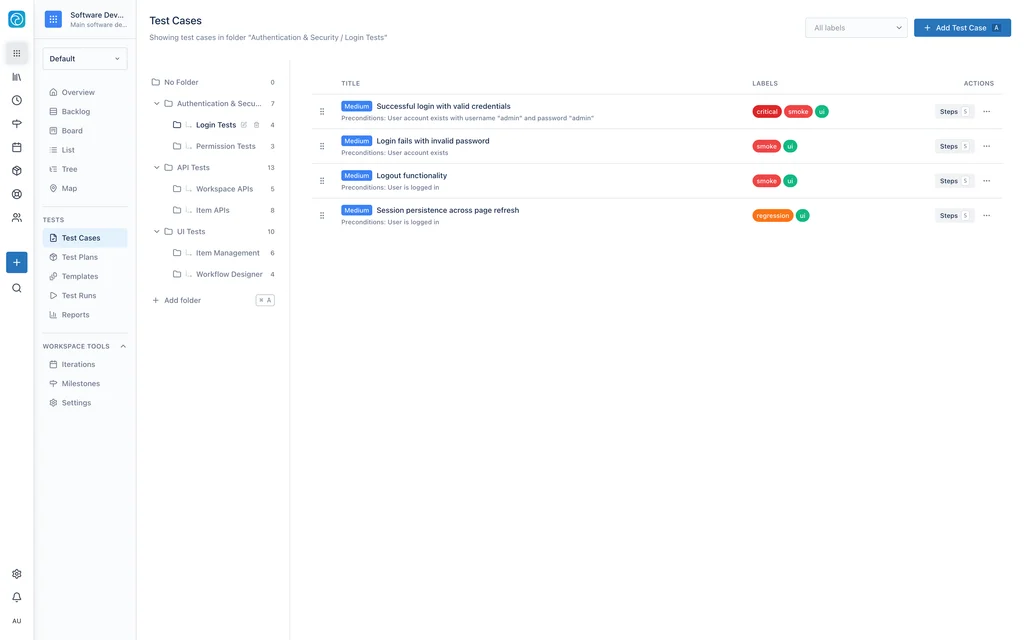
Test case fields
| Field | Required | Description |
|---|---|---|
| Title | Yes | The name of the test case. For a BDD case, the scenario name supplies the title. |
| Description | No | Notes about the test case. |
| Format | Yes | Steps or BDD. |
| Priority | Yes | Low, Medium, High, or Critical. Default: Medium. |
| Status | Yes | Active, Inactive, or Draft. Default: Active. |
| Estimated duration | No | The expected execution time, in hours and minutes. |
| Preconditions | No | The conditions that must be true before the test runs. |
Folders
Folders group test cases in a workspace. Folders support one level of nesting. A folder that contains subfolders cannot be a subfolder of another folder.
Select Add folder to create a folder. Select a folder to filter the list to that folder. Select All Tests to show every test case.
Labels
Labels group test cases across folders. A label has a name, a color, and an optional description. A workspace defines its own labels.
Assign more than one label to a test case. Filter the test case list by label.
Steps format
A steps test case contains an ordered list of steps. Each step has three fields:
| Field | Required | Description |
|---|---|---|
| Action | Yes | What the tester does. |
| Data | No | The input data or test values. |
| Expected result | Yes | The expected outcome. |
You can add, edit, reorder, and delete steps. A test case without steps has no procedure. Add steps to make the case executable.
BDD format
A BDD (behavior-driven development) test case uses Gherkin syntax. Windshift parses the Gherkin source into a feature and one or more scenarios. The scenario name becomes the test case title.
A Scenario Outline with an Examples table creates one result for each row. During execution, record a result for each Examples row. See Test runs.
Find a test case
Search test cases by title. Filter the list by folder and by label.